


ClubGG October 21 Update Notes
📅 Maintenance Schedule
October 21, 08:00 - 12:00 (UTC) (Approximately 4 hours)
🆕 New Features (Details provided below)
Club Game - Cucurucho Game Mode
ME UI/UX Improvements and New GGPass Feature (Change Flag)
Screen Guard
Action Voice
Improvements
Club Game - Club Lobby / Create New Table UI/UX Improvements
Club Game - All-In Sit Out Timer Adjustment
Tournament Clock UI/UX Improvements
Chat UI Improvements
Union Backoffice Renewal
System Updates
Discontinuation of Xsolla Payments for Union Backoffice
Club Game - Cucurucho Game Mode
A new game mode where all participating players pay an Ante and play a Cucurucho hand at specified intervals.
The following options can be configured when creating a table:
Ante: Amount paid by each participating player
Trigger Interval: Based on the number of hands or elapsed time
Board Type: Single Board or Double Board
Cucurucho Hand Rules
All participating players pay the Ante.
The flop is dealt immediately without a pre-flop betting round.
On the flop, players can only choose Pot Bet or Fold, with no further betting afterward.
The turn and river are dealt consecutively, and the pot is awarded to the winner.
Regular hands are played until the next Cucurucho hand is triggered.
Cucurucho | Create Cucurucho | ||
 |  | ||
[Double Board Cucurucho Hand]
 |
ME UI/UX Improvements and New GGPass Feature (Change Flag)
The Me menu UI/UX has been improved for better usability.
The My Account menu has been replaced with My GGPass, allowing users to access GGPass features directly.
New GGPass Feature: Change Flag
Users can change the country flag displayed next to their avatar.
Available flags are based on the following information:
Nationality: Nationality registered to the account
Residence: Registered country of residence
Login IP: Country determined by the current login IP address
Me | |
 |  |
[Change Flag Flow]  | |
New Feature - Screen Guard
A new Screen Guard feature has been added to the PC version to prevent screen content from being captured through screenshots or screen recordings.
When enabled, screen protection is applied to all game tables, with the option to enable or disable protection for individual tables.
The Protect the whole client option extends protection to the lobby and web pages opened within the client.
A shield icon at the top of each game table indicates its current protection status.
When protection is enabled, protected game tables will not appear in screenshots or screen recordings.
Settings > Screen Guard | |
 |  |
  | |
New Feature - Action Voice
Players can select a Voice that plays for seven different actions, including All-in, Raise, Bet, and Check.
Each player's selected Voice is also heard by other players at the same table.
Likewise, you will hear other players' actions using their selected Voices.
Settings > Sounds > My Action Voice | |
 |  |
 | |
Club Game - Club Lobby / Create New Table UI/UX Improvements
Club Lobby
Notice: Users can now enter longer notices and expand or collapse them to view the content.
The overall UI quality and usability of the Club Lobby have also been improved.
Create New Table
The table/tournament creation screen has been redesigned to make it easier to find and configure settings.
Required settings and additional options are now separated for better usability.
Additional options are grouped under Advanced Options / Table Policies, allowing users to view only the settings they need.
Existing table/tournament creation combinations and configuration rules remain unchanged.
Club Lobby | |
 |  |
Create New Table | |
 |  |
Club Game - All-In Sit Out Timer Adjustment
All-In Sit Out provides a grace period for players to complete counter-related tasks and return to the table after going All-In.
To reduce inconvenience to other players caused by prolonged seat occupancy, the grace period has been reduced from 15 minutes to 5 minutes.
Previous: 15 minutes
New: 5 minutes
The duration may be adjusted further based on actual usage and player feedback.
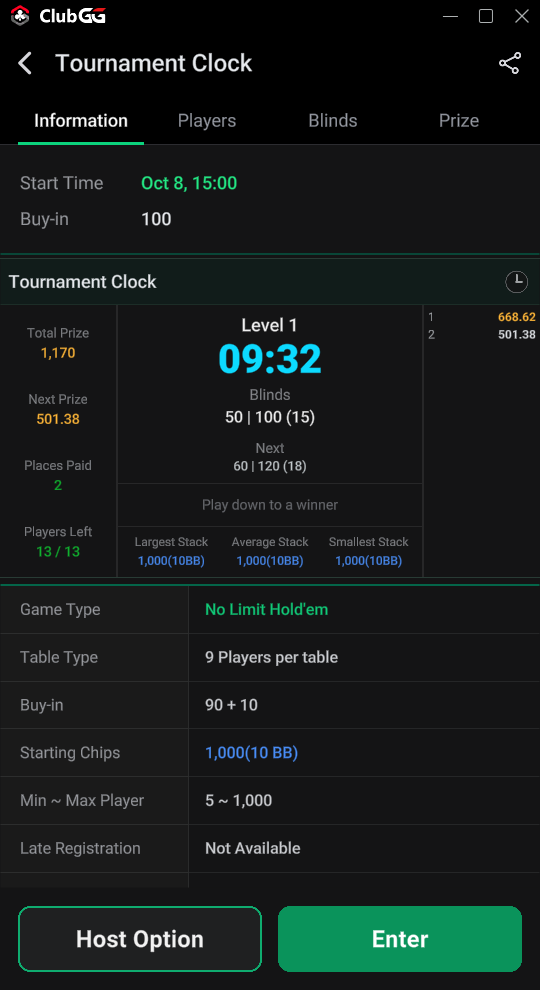
Tournament Clock UI/UX Improvements
The Tournament Clock UI has been improved to provide an at-a-glance view of key tournament information.
Players can now view important tournament progress information directly within the Clock UI.
The UI/UX has been standardized across GG brands to provide a more consistent and user-friendly experience.
 |  |
Chat UI Improvements
The Chat UI has been improved for better usability.
Users can now collapse the emoji list to expand the chat area and view more messages.
 |
Union Backoffice Renewal
The Union Backoffice UI and information layout have been redesigned to make key information easier to access and review.
The table/tournament creation UI has been aligned with the newly redesigned client UI to provide a more consistent and user-friendly experience.
After the update, users can access the new Union Backoffice through the existing URL:
New Version: https://union.clubgg.com/login
To ensure service stability, both the new and legacy versions will remain available.
Legacy Version: https://union2.clubgg.com/login
 |
 |
Union Backoffice - Xsolla Payment Discontinuation
Xsolla payment support for Union Backoffice has been discontinued.
Going forward, NPay will be the only supported payment method for Union Backoffice.
Existing Xsolla subscribers will receive refunds. Users who wish to continue using the service must purchase a new subscription through NPay.
This change applies only to Union Backoffice. Payments for Memberships, Club Levels, and Diamond purchases will continue to be supported as usual.
